

Intuit Quicken & QuickBooks
Connectivity for the Digital Banking Upgrade
If you use digital banking and connect your accounts to Intuit Quicken or QuickBooks, this page will help you prepare for our upgraded digital banking experience launching July 28. Follow the steps below to help keep your personal or business financial management software connected with minimal disruption.
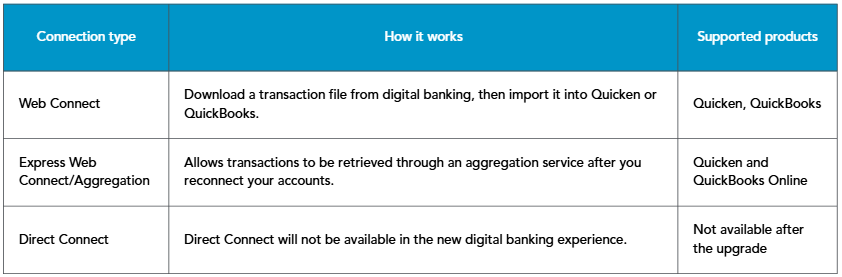
Beginning July 28, members will connect Quicken and QuickBooks to the new digital banking experience using Web Connect or Express Web Connect/Aggregation services. Direct Connect will no longer be available after the upgrade.
To avoid duplicate accounts or missing transactions, you will need to disconnect your current online banking connection and reconnect your accounts after the upgrade is complete.
Important: When reconnecting, link each account to the matching existing account in Quicken or QuickBooks. Do not create a new account unless you intentionally want to add a separate account register. Creating a new account may cause duplicate accounts or duplicate transactions.
What’s changing
Beginning July 28, members will connect Quicken and QuickBooks to the new digital banking experience using Web Connect or Express Web Connect/Aggregation services. Direct Connect will no longer be available after the upgrade.To avoid duplicate accounts or missing transactions, you will need to disconnect your current online banking connection and reconnect your accounts after the upgrade is complete.
Important dates
- Before July 27: Back up your Quicken or QuickBooks data file and complete a final transaction download.
- July 28 or after: Deactivate or disconnect your existing digital banking connection, then reconnect your accounts to the new digital banking experience.
- Beginning July 28: Express Web Connect/Aggregation services may experience up to five business days of downtime. If you need transaction updates during this period, use Web Connect if available.
Before the upgrade: prepare your Intuit product
- Back up your Quicken or QuickBooks data file.
- Download the latest product updates available for your software.
- Complete a final transaction download before July 27.
- Review and accept any pending transactions in your register.
- Make note of which accounts are currently connected so you can link them correctly after the upgrade.
After July 28: reconnect to the new digital banking experience
On or after July 28, deactivate or disconnect the current online banking connection in Quicken or QuickBooks, then set up the account connection again using the new digital banking experience.Important: When reconnecting, link each account to the matching existing account in Quicken or QuickBooks. Do not create a new account unless you intentionally want to add a separate account register. Creating a new account may cause duplicate accounts or duplicate transactions.
Connection options available after the upgrade
Conversion instructions
- Quicken Conversion Instructions
- QuickBooks Desktop Conversion Instructions
- QuickBooks Online Conversion Instructions
Video tutorials
Use these tutorials for additional help with the deactivate, disconnect, and reconnect process for your product.Frequently asked questions
Yes. If your accounts are currently connected to digital banking, you should back up your file, download final transactions before July 27, and reconnect on or after July 28.
You may be prompted to create a new register or account connection, which can result in duplicate accounts or duplicate transactions.
No. Direct Connect will no longer be available in the upgraded digital banking experience. Use Web Connect or Express Web Connect/Aggregation instead.
Aggregation services may be unavailable for up to five business days beginning July 28. During that time, you may use Web Connect to manually download and import transactions if you need updates before aggregation is restored.